
Image to Video AI: Animate a Still Photo
Upload a PNG, JPG or WebP photo up to 2 MB, describe the motion, and generate a short video. Choose a supported model, duration, resolution and aspect ratio, then review your credit estimate before submitting.
Open Image to VideoBrowsing examples is free. Generation requires an account and enough credits. Output quality and timing vary; review product details and text before publishing.
Reference preview for inspiration; this is not a verified Uyo output generated from your own image.
From a frame to a moving scene
Choose a scene. Look at the subject, light and movement, then make it your own.
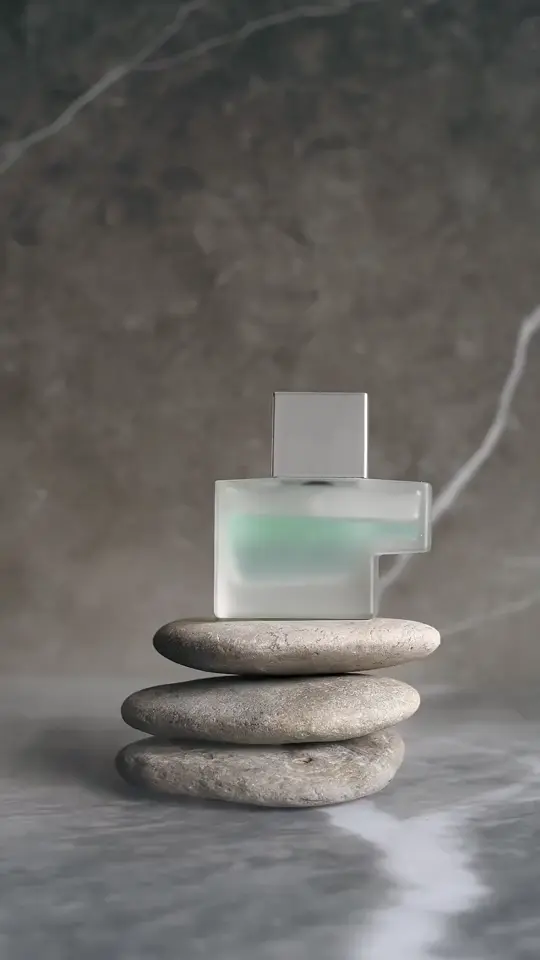
Perfume in soft light
Watch the drifting mist, glass reflections and stone texture in this filmed product study. Use it to plan lighting and a restrained camera move.
Suggested promptAn unbranded frosted glass perfume bottle balanced on smooth dark stones, soft side lighting, delicate mist drifting through the foreground, subtle reflections, a slow close-up push, understated product film, no text or logos.

Filmed footage, not AI generated. Explore its framing, light and camera movement; the prompt is a suggested starting point. Pexels · Mikhail Nilov ↗
How It Works
Upload your image
PNG, JPG or WebP. Up to 2 MB per image.
Generate and preview
Describe your subject, scene and camera movement to generate a short AI video. Choose a supported model, duration, resolution and aspect ratio, then preview and download the finished result.
Download and keep creating
Open a finished creation to preview, download or continue editing.
What does one task cost?
Examples use the Starter pack: $9.00 for 400 credits, valid for 30 days. Image and video tasks share this balance.
| Model | Example settings | Estimated credits | Share of pack value |
|---|---|---|---|
| GPT Image 2 | 1K · 1 image | 10 credits | $0.23 |
| Seedance 2.5 | 720P · 5s | 27 credits | $0.61 |
| Seedance 2.5 | 1080P · 10s | 65 credits | $1.46 |
The minimum pack purchase is $9.00. The smaller amounts above are allocations of that pack, not separate checkout prices.
Estimates use the same model and settings calculation as the workbench. The server validates the actual request and cost. Different settings change the estimate; completed results are not guaranteed to meet your creative preference. Failed-task credit returns and cash refunds follow different rules.
Models, output settings and usage conditions
These are the settings offered in the Uyo studio. Availability depends on the active provider. Settings for dedicated tools such as Roadster and Talking Pet can differ.
| Model | Available settings | Usage and export |
|---|---|---|
| Seedance 2.5 | 480P · 720P · 1080P · 5s · 10s | Check conditions |
| Wan 3.0 | 720P · 1080P · 5s | Check conditions |
| MiniMax H3 | 768P · 2K · 5s · 10s | Check conditions |
| Kling 3.0 Turbo | 720P · 1080P · 5s · 10s | Check conditions |
| Hailuo 2.3 | 768P · 1080P · 6s | Check conditions |
| Wan 2.7 | 720P · 1080P · 5s | Check conditions |
| Seedance 2.0 | 480P · 720P · 1080P · 5s · 10s | Check conditions |
Before using an output commercially
Check the terms of your task’s provider and selected model, along with your rights to the photos, people, products and other material you submit. Buying credits alone does not establish a commercial-use license for every model or use. Uyo does not promise exclusivity, copyright eligibility or exact product fidelity.
Will a download have a watermark?
The studio downloads the original output without adding a separate Uyo logo overlay. A provider watermark or content credential may still be present. Check the finished file; a watermark-free result is not guaranteed across every model and provider.
Public APIMart and KIE terms reviewed on 2026-10-22; these links are references, not a claim that every model is licensed for every commercial use. For another configured provider, check that provider and the underlying model terms before use.
Choose the output for your project
Select from the resolutions, lengths, and aspect ratios supported by the chosen model. See your estimated cost before submitting.
Try It NowKeep your creative process connected
Create an image, make an edit, and send the result into a video. Your completed tasks stay together in My Creations.
My CreationsFrequently Asked Questions
How do I generate a video?
Open the video workspace and choose text-to-video or image-to-video. Describe the scene and motion, and add a reference image for image-to-video. Choose a supported duration, aspect ratio and resolution, check the estimated credits, then select Generate.
Can I turn an image into a video?
Yes. Choose Image to Video in the video workspace and upload a reference image. You can also send a completed image to the video workspace.
Where can I find my creations?
Sign in and open My Creations. Your saved tasks and results are linked to your account, so you can return after refreshing the page.
What happens when a task fails?
The task shows a failure state. Eligible deducted credits are returned through the task system. Check Credit History and contact support if something looks incorrect.
How are credits calculated?
Image quality, the selected model, and video duration can change the cost. The generate button shows an estimate based on your current settings.
Does browsing a preview use credits?
Browsing public reference videos does not submit a generation task. A reference preview is not a tested Uyo output made from your image. To generate your own result, sign in, provide the required input and review the credit estimate. Starter-credit offers depend on your account.
Does this make a complete finished advertisement?
This workflow generates a short clip from your prompt and optional reference image. Do not assume it includes a finished ad script, captions, licensed music or a call-to-action edit. Review the clip, confirm usage rights and complete any additional editing your campaign requires.
What if a task fails, or I dislike a completed video?
Confirmed failed tasks return eligible deducted credits. A completed result that does not match your preference is not a technical failure and does not automatically restore credits. Cash refunds are reviewed separately under the Refund Policy.